
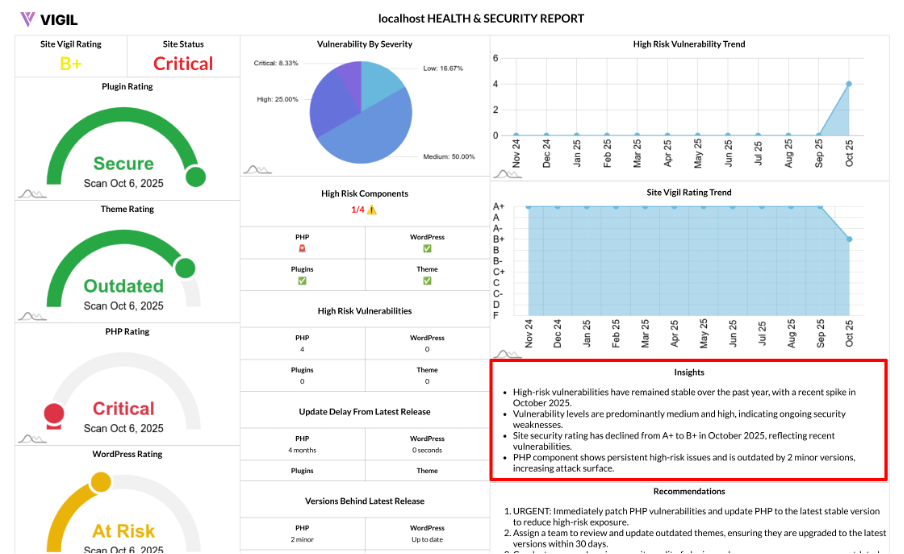
AI Insights: Turning Your Trends Into Plain Language
Your security report includes two key AI-generated insights blocks that summarize your historical data into clear, actionable takeaways:
- High Risk Vulnerability Trend Insights
- Site Vigil Rating Trend Insights
These insights are crafted by analyzing your month-over-month trends and summarizing them into plain language, making it easier to understand and share with stakeholders.
What the AI Reads
The AI analyzes the following historical data points:
- High Risk Vulnerability Trend: Month-wise totals of High and Critical vulnerabilities.
- Site Vigil Rating Trend: Month-wise overall ratings (0–10) mapped to grades (A+ to F).
The AI system processes this data and generates compact insights that highlight patterns such as:
- Steady improvement
- Spikes in vulnerabilities or ratings
- Regressions or downward trends
- Potential drivers to investigate
What the Insights Say (Examples You’ll See)
Here are examples of the types of insights you might encounter:
High Risk Vulnerability Trend Insights:
- "High/Critical vulnerabilities declined for 3 consecutive months; risk reduction efforts are working."
- "Spike in the last 2 months; investigate recent plugin/theme updates and delayed patches."
Site Vigil Rating Trend Insights:
- "Overall rating improved from C to B+ over 6 months; largest jump followed a core and PHP upgrade."
- "Volatile month-to-month scores suggest inconsistent maintenance; standardize a monthly update window."
Why These Insights Are Valuable
These AI-generated insights provide several benefits:
- Translate Charts into Action: The insights clearly explain what changed, why it matters, and what actions to take next.
- Highlight Meaningful Patterns: Quickly identify drops, spikes, drift, and plateaus in your site’s security performance.
- Presentation-Ready: These insights are tailored for easy sharing with executives, clients, or in audits.
How to Act on Them
Here’s how to act based on the insights provided:
- If insights flag a spike in High/Critical vulnerabilities:
- Patch Critical vulnerabilities first, then move on to High vulnerabilities.
- Check release notes for updates to plugins and themes that may have contributed to the spike.
- If insights note rating volatility:
- Implement a fixed maintenance cadence and re-scan after updates to ensure consistent results.
- If insights credit improvements to upgrades:
- Repeat that successful strategy (like a core or PHP upgrade) across other sites or environments to see similar improvements.
Output at a Glance
The AI insights are presented as a series of short, action-oriented sentences embedded directly in your report data. These insights are designed to complement the Vulnerability Breakdown and Trends Chart, helping readers quickly grasp the “what” and the “so what.”
Why AI Insights Matter
These insights take the last 6–12 months of data and turn it into a brief, clear narrative—one that’s easy to understand for leadership and precise enough for your technical team to take the next steps.