
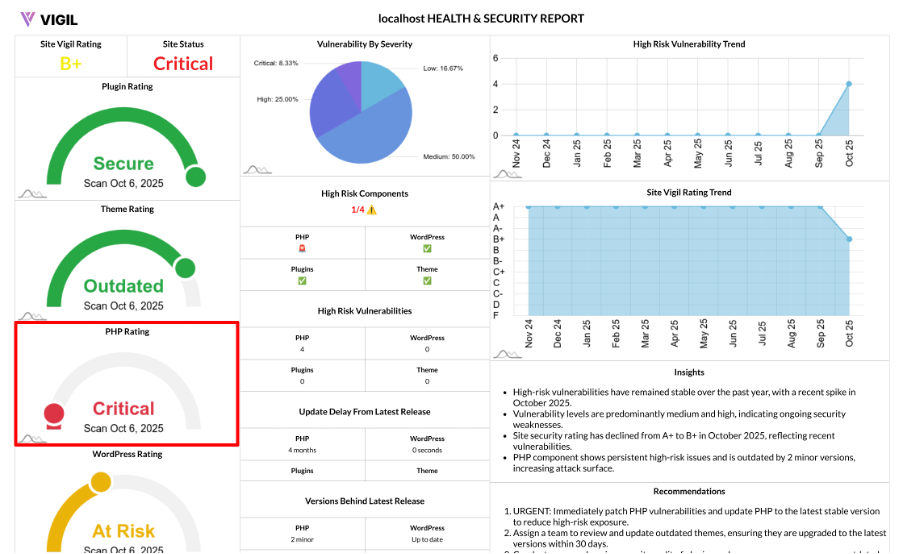
PHP Rating: How We Score Your Site’s PHP Health
Your PHP version is the backbone of your WordPress site’s performance, security, and compatibility. Our PHP Rating simplifies this crucial aspect into a single, actionable score that helps you monitor and improve your site’s PHP health.
What the PHP Rating Represents
The PHP Rating provides a 1–6 score that reflects two key factors:
- Vulnerability Severity: Are there any known vulnerabilities in your installed PHP version?
- Version Freshness: Is your PHP version up to date, or is it outdated?
How We Calculate the PHP Rating
We assess your installed PHP version for vulnerabilities based on severity (Critical, High, Medium, Low). Here's how we determine the PHP Rating:
- If vulnerabilities are found, we assign a score based on the worst severity:
- Critical → 1
- High → 2
- Medium → 3
- Low/None but risk flags present → 4
- Outdated (No CVEs, but behind latest release) → 5
- If no vulnerabilities are found:
- Fully current (or ahead of current release) → 6 (Secure)
- Behind the latest supported release → 5 (Outdated)
In short: known CVEs (Common Vulnerability Exposures) reduce the score, while being on a supported, up-to-date PHP version improves it.
Score Meanings at a Glance
Here’s a quick reference for what each PHP Rating means:
- 6 — Secure: No known vulnerabilities, PHP version is current
- 5 — Outdated: No known vulnerabilities, but PHP version is behind the latest supported release
- 4 — At Risk: Low-level concerns detected
- 3 — At Risk: Medium severity vulnerabilities present
- 2 — Vulnerable: High severity vulnerabilities present
- 1 — Critical: Critical severity vulnerabilities present; immediate action required
Why PHP Rating Matters
Your PHP Rating is critical for several reasons:
- Security: Outdated PHP versions miss essential security patches and become a target for exploits.
- Performance: Newer PHP versions are faster, more efficient, and optimized for better performance.
- Compatibility: Themes, plugins, and WordPress core rely on a supported PHP version to function properly. Running an outdated version can lead to compatibility issues.
How to Improve Your PHP Rating
To improve your PHP Rating:
- Update to a Supported PHP Release: Ensure you're using the latest stable PHP version supported by your server stack.
- Test Updates in Staging: Before applying PHP updates to your live site, test them in a staging environment to confirm compatibility with WordPress core, themes, and plugins.
- Establish a Quarterly Review: Set a reminder to review and update PHP every quarter to avoid falling behind on versions.
Example Scenarios
Here are some real-world scenarios for understanding the PHP Rating:
- PHP has 1 High vulnerability → Score 2 (Vulnerable)
- No vulnerabilities, but the version is behind → Score 5 (Outdated)
- No vulnerabilities, and the version is current → Score 6 (Secure)