
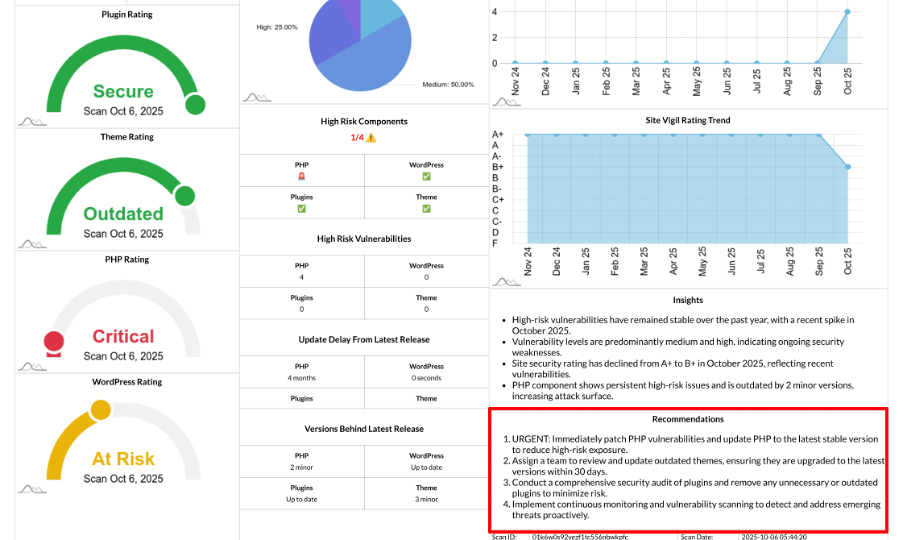
Actionable Recommendations: AI-Powered To-Do List for Faster Risk Reduction
Your security report includes a curated, action-oriented recommendations section powered by AI, generated from your site’s real scan data. It summarizes what to fix first across PHP, WordPress core, themes, and plugins—plus update hygiene and trends—so you can move from insight to action quickly.
What Feeds the Recommendations
The AI-powered recommendations are based on a structured overview of your site’s security health, including:
- Site Vigil Rating (grade)
- Site Status (e.g., secure, outdated, high, critical)
- Component Ratings: PHP, WordPress core, theme, plugins
- Vulnerability Breakdown (Critical/High/Medium/Low vulnerabilities)
- High Risk Components (which pillars are “hot”)
- High Risk Vulnerability Trend (monthly High+Critical)
- Site Vigil Rating Trend (monthly ratings)
- Update Delay from Latest Release (how far behind)
- Versions Behind Latest Release (Up to date / N major/minor/patch)
- Outdated Components list (installed vs. latest)
- All detected vulnerabilities (condensed)
The result is a concise, prioritized checklist tailored to your site’s current state, helping you focus on what matters most.
What the Output Looks Like
The recommendations section consists of:
- Recommendations: A short, ranked list of fixes to address.
- Insights: Brief rationale and context explaining the why behind each recommendation.
Example Recommendations You Might See:
- Patch Immediately: Update plugins with Critical/High CVEs; validate core after the update.
- Reduce Exposure: Remove unused or abandoned plugins and inactive themes.
- Close Version Gaps: Upgrade PHP to a supported release; update WordPress core to the latest stable version.
- Theme Maintenance: Update the active theme; verify template overrides post-update.
- Process Improvements: Enable auto minor updates, schedule monthly maintenance, re-scan after changes.
How Recommendations Are Prioritized
The recommendations are prioritized based on the following:
- Critical and High vulnerabilities: These represent the biggest risk reduction, so they are fixed first.
- Outdated Components: Fixing outdated components helps prevent new vulnerabilities and compatibility issues.
- Medium/Low items and hygiene improvements: These are addressed later to maintain long-term stability and ensure ongoing security.
Why This Matters
The Actionable Recommendations section is valuable for several reasons:
- Clear Next Steps: Turns complex data into an ordered to-do list that’s easy to follow.
- Outcome-Focused: Aligns with the trends—recommended actions aim to lower High/Critical vulnerability counts and raise your Site Vigil Rating.
- Stakeholder-Ready: The recommendations are easy to communicate, assign, and track to closure.
How to Use Them
To make the most of your Actionable Recommendations:
- Treat the first 2–4 items as this sprint’s security work.
- After completing the recommendations, re-scan your site—your trend charts and Site Vigil Rating should improve.
- Standardize a Monthly Cycle: Ensure that “Outdated” items don’t recur by setting up a monthly update process.