
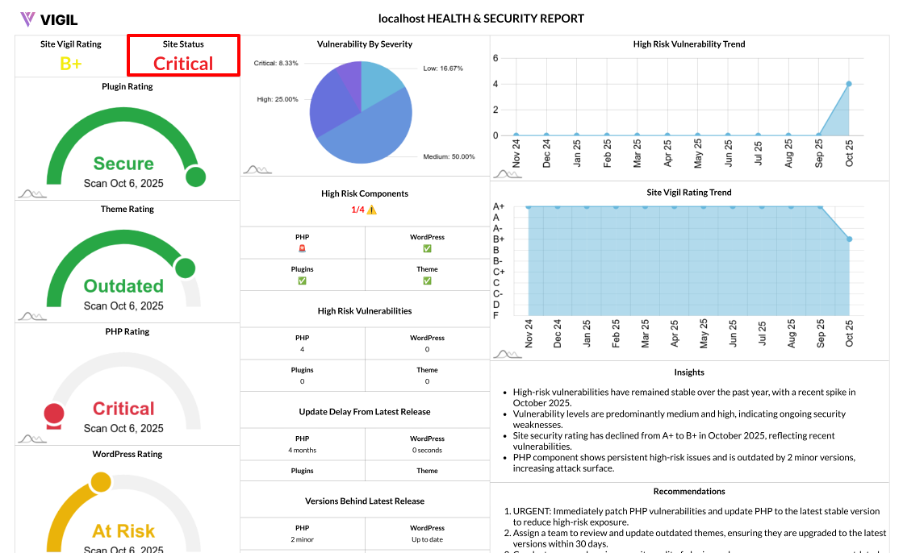
Site Status: A Clear, Actionable Snapshot of Your WordPress Risk
Your website’s health should never be a mystery. Site Status provides a simple, color-coded label that summarizes the highest priority issue on your WordPress site—so you can act quickly and communicate clearly with your team and stakeholders.
What Is Site Status?
Site Status is a single, easy-to-understand signal that reflects the most urgent issue detected across the following components:
- PHP
- WordPress core
- Active theme
- Active plugins
It focuses on the worst current condition, ensuring your team always knows the top priority for fixes.
How We Decide Your Status
Behind the scenes, Site Status totals the issues across all components by severity—Critical, High, Medium, Low—and also checks if software is outdated. We then set your status based on the following strict priority:
- Critical → High → Medium → Low → Outdated → Secure
Along with the status label, you’ll also see:
- A color (for dashboards and reports)
- A status score from 1 to 6 (1 = worst, 6 = best)
What Each Status Means
Each status is color-coded and assigned a score based on severity, helping you prioritize issues effectively:
- Critical (score 1, red): Active, severe exposures that could lead to a site compromise. Immediate action required.
- High (score 2, orange-red): Serious risks or known exploitation paths. Prioritize resolution within 24–72 hours.
- Medium (score 3, yellow): Meaningful issues; schedule for resolution in the current sprint.
- Low (score 4, yellow): Low impact; batch with regular maintenance tasks.
- Outdated (score 5, lime): Software versions are behind. No active severe CVEs detected, but the risk increases over time.
- Secure (score 6, green): No detected issues; continue with regular updates and monitoring.
Why This Model Works
- Worst Case First: Site Status focuses on the most urgent risk, not an average that might hide critical problems.
- Full Coverage: It considers PHP, core, theme, and plugins, providing a complete picture of your site’s health.
- Built for Reporting: The consistent labels, colors, and scores make it easy to display and report on site health in dashboards and PDFs.
Real World Examples
Here are some example scenarios illustrating how Site Status works:
- 0 Critical, 2 High, 5 Medium, 1 Outdated → Status: High (score 2)
- 0 Critical/High/Medium, 4 Low → Status: Low (score 4)
- No vulnerabilities, but outdated plugins → Status: Outdated (score 5)
- Fully up to date, no issues → Status: Secure (score 6)
How to Improve Your Status Fast
To improve your Site Status quickly, follow these steps:
- Fix Critical and High Issues First: Patch, update, or replace affected plugins/themes; update WordPress core.
- Close Version Gaps: Move PHP, core, theme, and plugins to supported, stable releases.
- Reduce Attack Surface: Remove unused or abandoned extensions, and verify all software sources.
- Establish Cadence: Set a monthly maintenance schedule with emergency patch windows for critical updates.
Where You’ll See Site Status
You’ll see Site Status in the following areas:
- In the report header and executive overview: For a quick health summary.
- As a color label with a numeric score: For easy triage and prioritization.
- In network/multisite views: To highlight the riskiest sites instantly across your network.