
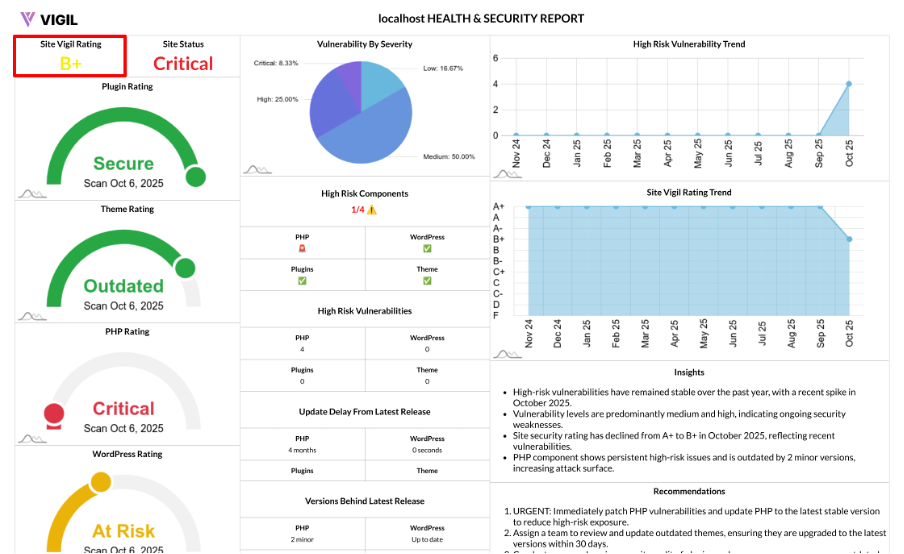
Understanding the Site Vigil Rating: How We Score Your WordPress Site’s Health
Managing a WordPress site comes with a responsibility to maintain security, ensure timely updates, and manage software hygiene. Site Vigil Rating simplifies these complex technical aspects into a single, easy-to-understand score that reflects the health of your site. This score can be shared with your team, clients, or leadership to make informed decisions, all supported by a transparent scoring system.
What is the Site Vigil Rating?
The Site Vigil Rating is a 0–10 score, which is mapped to a letter grade (A+ to F), that represents your overall software health. It covers four key areas:
- PHP
- WordPress core
- Active theme
- Active plugins
Each of these areas contributes equally to the final score, providing a balanced view of your site’s maintenance and risk posture.
How the Rating Is Calculated
We assess the four components—PHP, WordPress, theme, and plugins—based on several criteria:
- Vulnerability Levels: Critical, High, Medium, Low
- Outdated Software Status
Each issue type carries a weighted penalty. More severe issues lead to a higher deduction from the score. Here's how we calculate your score:
- Base Score: Every component starts with a score of 10.
- Penalties for Issues: Points are deducted for vulnerabilities and outdated software.
- Cap on Deductions: Each component’s score is capped at a minimum of 0.
- Final Rating: The four component scores are averaged to generate the Site Vigil Rating.
- Letter Grade: Finally, the score is converted into a letter grade.
This approach ensures fairness—while one area’s poor health can affect your grade, improving any component can quickly boost your score.
The Grade Scale
The Site Vigil Rating is converted into the following letter grades:
- 10 → A+
- 9 → A
- 8 → A−
- 7 → B+
- 6 → B
- 5 → B−
- 4 → C+
- 3 → C
- 2 → C−
- 1 → D
- 0 → F
Note: Your grade reflects the combined outcome of vulnerabilities and outdated versions.
What Impacts Your Rating the Most?
Several factors influence your Site Vigil Rating, including:
- Critical and High vulnerabilities in core, theme, or plugins.
- Severely outdated PHP or WordPress versions.
- Multiple Medium vulnerabilities across plugins.
- Outdated active theme or a large number of outdated plugins.
Example: How One Site’s Grade Comes Together
Let’s take a look at a sample calculation:
- PHP: 0 high/critical, 1 medium, outdated → small deduction
- WordPress: Fully up-to-date → no deduction
- Theme: 1 high → strong deduction
- Plugins: 2 medium → moderate deduction
Final Result: We average all four component scores and produce a final grade (e.g., B or C+) based on severity and maintenance status.
Why This Model Works
- Balanced: We treat all four software areas equally to provide a comprehensive view.
- Transparent: Penalties for vulnerabilities and outdated software are predictable and explicit.
- Practical: Addressing high-impact issues leads to immediate improvements in your rating.
- Comparable: Track your grade over time or compare across multiple sites in your network.
How to Improve Your Site Vigil Rating
To improve your Site Vigil Rating, follow these steps:
- Fix First: Resolve Critical and High vulnerabilities immediately.
- Update Consistently: Ensure PHP, WordPress, themes, and plugins are kept up-to-date with stable, supported versions.
- Trim Risk: Remove unused, abandoned, or unverified plugins and themes.
- Standardize: Set a monthly update schedule and establish a change control checklist.
FAQs
Is this only about security?
No. Outdated software—even without known CVEs—can lower your score by increasing future risk.
Will a single bad plugin tank my grade?
A problematic plugin can significantly lower the plugins component score, affecting your overall grade. Fixing or replacing it can quickly improve your rating.