
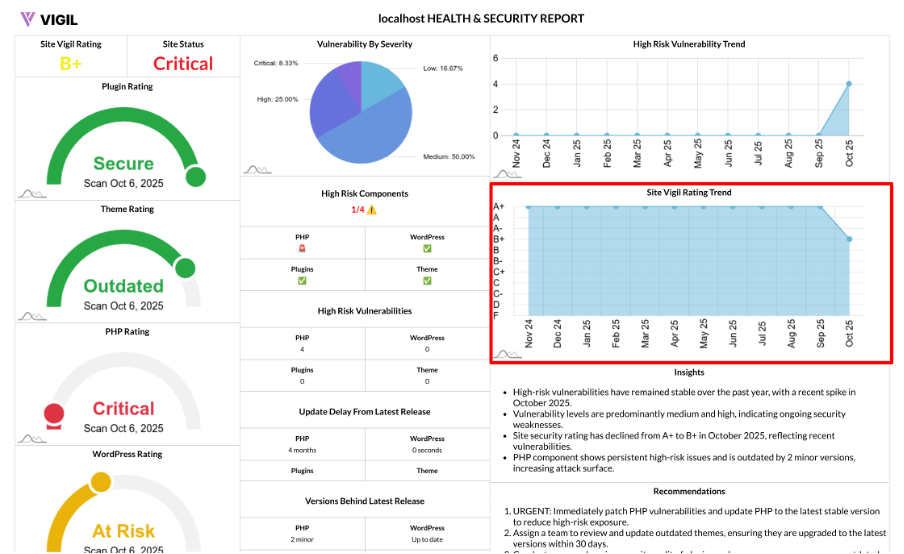
Site Vigil Rating Trend: Month by Month Health of Your WordPress Stack
Your site’s security posture isn’t static. The Site Vigil Rating Trend chart tracks how your overall site health evolves month by month, giving you a clear view of progress and helping you catch regressions early.
What It Shows
The Site Vigil Rating Trend chart provides a 12-month (or a selected time window) timeline of your Site Vigil Rating, with one data point per month representing your composite score across the following components:
- PHP
- WordPress core
- Active theme
- Active plugins
How It Works
For each month in the selected period, we follow these steps:
- Collect Severity Counts: We gather the severity counts for each component—PHP, WordPress core, theme, and plugins.
- Apply Rating Logic: Using the same logic from the main Site Vigil Rating, we penalize Critical, High, Medium, Low, and Outdated issues per component.
- Compute Monthly Score: We calculate a score from 0–10 for each component and average them to get the final monthly 0–10 rating.
- Grade Mapping: The numeric rating is then mapped to a letter grade (A+…F) for easy interpretation.
- Plot the Trend: The chart displays the numeric rating per month, and you can annotate it with the corresponding grade.
Output Example:
You’ll see output like this:
- [{ year: "Oct 24", value: 9 }, { year: "Nov 24", value: 8 }, …]
Why It Matters
The Site Vigil Rating Trend chart provides several key benefits:
- Trend Visibility: It shows whether your overall risk is shrinking or creeping up over time.
- Outcome Proof: You can directly tie your remediation efforts to improvements in your rating.
- Release Hygiene: It helps you spot any dips after major releases, migrations, or plugin changes.
How to Read It
Here’s how to interpret the Site Vigil Rating Trend:
- Upward Trend (Toward 10/A+): Strong health gains—keep your update cadence and security processes.
- Flat at 6–7 (B range): Your site is stable but has room to reduce Medium/High items and outdated components.
- Dips or Volatility: Investigate recent updates, new plugins, or delayed patching. You may need to revisit your process.
How to Improve the Trend
To improve your Site Vigil Rating Trend, follow these steps:
- Fix Critical and High Findings First: These have the biggest impact on your rating, so address them immediately.
- Close Outdated Gaps: Update PHP, WordPress core, themes, and plugins to the latest supported versions.
- Remove Abandoned Extensions: Get rid of unused or abandoned plugins and themes to reduce risk.
- Standardize Maintenance: Set a monthly update schedule, and conduct post-release scans to ensure your stack stays healthy.
Pair It With
To get a deeper understanding of your site’s health and security:
- Vulnerability Breakdown: This helps you understand the severity mix behind rating changes and what’s driving improvements or dips.
- High Risk Components: Use this to pinpoint which part of your stack (PHP, theme, core, plugins) is dragging your score down.